




An HVAC maintenance checklist keeps Central Texas cooling systems from failing when summer temperatures hit triple digits. This step-by-step guide is for Austin homeowners and property managers who want practical maintenance completed in 30 to 60 minutes, without touching refrigerant, capacitors, or sealed electrical panels.
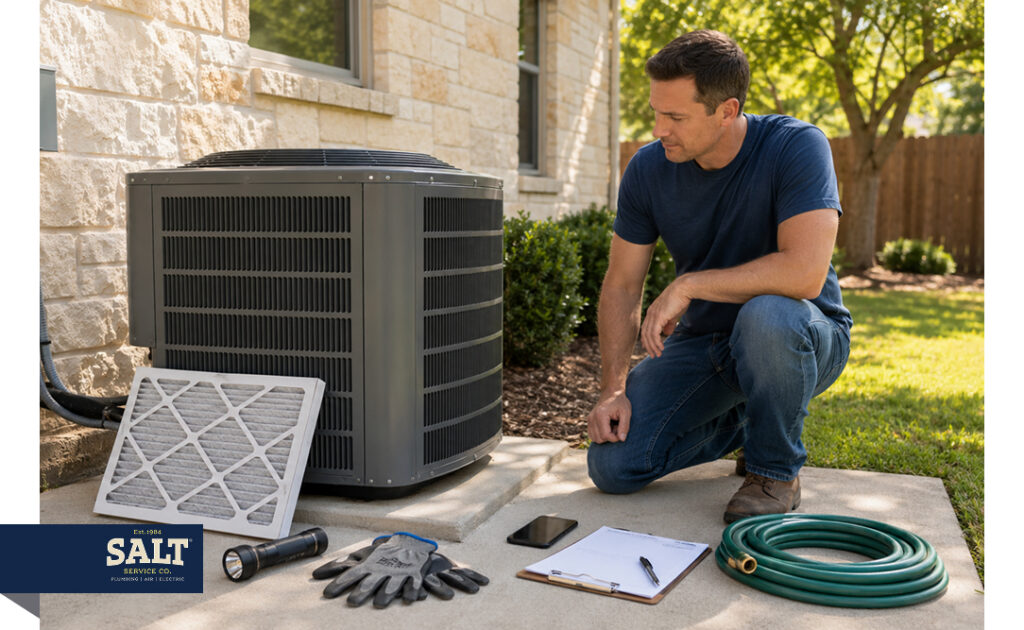
What You’ll Need
- Correct-size air filter and a flashlight
- Garden hose with a gentle spray nozzle and a soft brush
- Work gloves and a phone for notes
- Optional: shop vac and screwdriver
Since 1984, SALT Service Co. has served families across Travis and Williamson counties. Following these steps reduces breakdown risk and improves efficiency. If you’d rather have it handled end-to-end, book a professional AC tune-up with SALT.
How Often Should You Maintain Your HVAC System?
Austin homeowners should schedule professional HVAC maintenance twice a year—once before the cooling season and once before winter—while completing basic checks such as inspecting the filter every month during peak summer.

Step 1: Identify and Document Your System
Before starting any maintenance, document your system’s baseline so your DIY efforts are trackable and SALT technicians can diagnose faster if needed.
Determine if you have a traditional central AC and furnace or a heat pump. Both use an outdoor condenser for cooling, but heat pumps provide year-round heating.
Photograph the model and serial number labels on both indoor and outdoor units. You’ll need these for parts orders and warranty claims.
Record your current thermostat modes (Cool/Auto) and temperature setpoints.
Listen for unusual buzzing or rattling, feel for weak airflow at vents, and note any hot spots in the home. Log these with the date and outdoor temperature for future comparison.
Step 2: Power Down Your System and Set Safety Boundaries
Fully de-energize the system before working near it. This prevents electrical shock and protects fan blades from accidental contact.
Switch the thermostat system setting to OFF.
Locate the disconnect box mounted near the outdoor condenser and flip the switch or pull the handle to the OFF position.
Flip the service switch near the air handler or furnace. This is typically a red light-switch plate mounted on the wall.
Wait 5 minutes: this allows the electrical charge to dissipate. Wear work gloves and eye protection. Keep water away from electrical panels and never use a pressure washer on delicate condenser fins.
Do not attempt capacitor testing, electrical meter work, or opening sealed compartments. These high-voltage tasks require a licensed SALT technician.
Step 3: Replace Your Air Filter for Maximum Airflow
Don’t wait for the 90-day mark on the filter packaging. During triple-digit Austin summers, dirty filters cause frozen coils and spike utility bills. Check your filter monthly during peak cooling season.
Locate your filter in the return grille, hallway slot, or air handler cabinet. Note the size printed on the frame and confirm the airflow arrow points toward the equipment.
Perform a light test: hold the filter up to a light source. If you cannot see through the pleats, it is restricting airflow and needs replacement.
For 1-inch filters, prioritize frequent changes over ultra-high MERV ratings. High-MERV filters strain motors in systems not designed for them. If you need high filtration for allergies, ask a technician before upgrading.
Once installed, restore your thermostat settings. You should feel noticeably stronger airflow at your supply vents.
Step 4: Optimize Thermostat Settings for Summer Efficiency
Confirm your thermostat is set to Cool with the fan on Auto. Avoid the On setting: it keeps the fan running after the compressor stops, pulling moisture from the damp coil back into your home and causing a sticky, clammy feeling.
Summer thermostat best practices:
- Limit temperature setbacks to 5 degrees. Large shifts cause long recovery runs during peak afternoon heat, which drives up energy costs.
- Enable maintenance alerts on smart thermostats. Use comfort features cautiously because they can mask real drainage or coil issues.
- Property managers: standardize setpoints across units to reduce unnecessary service calls.
- Heat pump users: cooling setup is identical to standard units. Do not adjust installer-specific settings.
Success check: the system cycles normally and air feels consistently cool and dry.
Step 5: Clear the Condensate Drain Line
A clogged condensate drain is one of the most common causes of summer system failures. Algae or dust blocking the PVC pipe trips a safety switch that shuts the unit down to prevent indoor flooding.
Identify the primary drain line at your indoor air handler.
Check the emergency pan for standing water, rust, or wet insulation. Any moisture here is urgent.
Clear minor clogs by applying a wet/dry shop vac at the outdoor exit for 30 seconds, or flush the line with water if accessible.
During operation, you should see a steady drip from the outdoor drain line. Use only manufacturer-approved treatments; avoid harsh chemicals that damage PVC.
Call for professional AC repair in Austin if you notice recurring clogs, musty odors, ceiling stains, or a safety switch that trips repeatedly.

Step 6: Restore Airflow to Your Outdoor Condenser
Outdoor unit performance drives cooling capacity. With power confirmed OFF from Step 2, clean and clear the condenser to reduce strain during Austin heat.
- Maintain at least 2 feet of clearance on all sides and above the unit.
- Remove loose leaves and sticks by hand while wearing gloves.
- Rinse the fins with a garden hose from the inside out. Never use a pressure washer since it destroys delicate metal fins.
- Straighten bent fins with a fin comb only if you are confident and gentle. If coils need deep cleaning, schedule a professional tune-up.
Success check: the condenser fan runs smoothly without rattling and cooling performance improves during the afternoon peak.
Step 7: Inspect Vents and Manage Room-by-Room Airflow
Closing vents in unused rooms is a widespread mistake that restricts airflow and strains the blower motor. Walk through your home and confirm all supply registers are fully open and unobstructed by furniture or rugs. Verify that large return grilles are clear so the system can breathe properly.
Rooms that stay warm during afternoon hours often have attic insulation gaps or air leaks. If a ceiling feels hot to the touch, that is likely the culprit. Property managers should give tenants a simple checklist prohibiting blocked returns and clarifying filter responsibilities.
Call SALT at (737) 386-9507 if you notice:
- Whistling sounds from return grilles
- Visible duct disconnections in accessible areas
- Persistent dust buildup or heavy airflow imbalance across rooms
Step 8: Validate Performance and Know When to Call a Pro
Restore power and run a 10-to-15-minute cooling test. This confirms the system reaches a stable operating state before the first 100-degree stretch.
Verify these results during the test:
- The outdoor unit turns on and the fan spins without unusual buzzing.
- Indoor airflow is steady and supply vents feel consistently cool.
- No new water pools around the indoor air handler.
Shut down the system and call for service immediately if you observe:
- Ice on refrigerant lines or coils: indicates restricted airflow or low refrigerant.
- Burning smell: sign of a serious electrical failure.
- Short-cycling: rapid on/off cycles that wear out the compressor fast.
A professional AC tune-up catches what homeowners cannot see: capacitor wear, refrigerant levels, and blower performance. If your system still runs sluggish after completing this checklist, schedule service before the heat peaks.
Pro Tips: What the Professionals Check That You Cannot
A professional HVAC tune-up covers the tasks beyond this DIY checklist.
Technicians test capacitors and contactors for wear, components that fail silently before causing total system shutdowns on 100-degree Austin afternoons.
Refrigerant subcooling and blower airflow are verified to confirm peak efficiency and lower utility bills.
Heat pumps require specific checks on defrost logic and reversing valves. Make sure your technician evaluates the control board for year-round reliability. Skipping these inspections often leads to system failure during the first cold snap.
Maintain Documentation for Warranty Protection
Save every service invoice in a dedicated folder. Manufacturers often require proof of professional maintenance to honor parts warranties. Avoid DIY work on sealed components: accidental damage to control boards can void your coverage and result in expensive out-of-pocket repairs.
When Repair Costs Signal Replacement
If your system is over 12 years old and repair costs exceed 50% of its replacement value, a new installation is worth considering. A modern AC system delivers immediate energy savings and long-term reliability that stacking repairs on aging equipment cannot match.
Frequently Asked Questions About Summer HVAC Maintenance
How often should I change my HVAC filter during Austin’s summer?
Check your air filter every 30 days during peak Central Texas summer. Many filters claim to last 90 days, but triple-digit heat and high local pollen counts cause them to clog much faster. If you have pets, allergies, or live near construction, replace the filter every three weeks. Signs of an overdue filter: visible dust on vents, weak airflow, and a system that runs longer than usual.
What maintenance is safe for homeowners, and what should I never DIY?
Safe DIY tasks are limited to non-electrical and non-refrigerant work. You can replace filters, clear debris from the outdoor unit, rinse condenser fins with a garden hose, and inspect the condensate drain visually. Never test capacitors, handle refrigerant, or open sealed electrical compartments. These tasks carry a real risk of serious injury and can permanently damage your system. When in doubt, call SALT at (737) 386-9507.
I have a heat pump. Does summer prep change?
No. The summer maintenance process for a heat pump is virtually identical to a standard central AC system. In cooling mode, a heat pump moves heat from your home to the outdoors exactly like a traditional air conditioner. Follow the same airflow, coil, and drainage steps in this checklist. The meaningful differences only show up in winter, when the heat pump reverses operation.
Why does my house feel sticky even when the air is cool?
High indoor humidity is often caused by an incorrect thermostat fan setting or an oversized HVAC system. Set your fan to Auto rather than On. The On setting keeps the fan running after the compressor stops, pulling moisture back into your home before it can drain. If air still feels clammy, your system may be short-cycling or have a dirty evaporator coil. SALT Service Co. can assess whether you need specialized humidity control.
Could DIY maintenance void my HVAC warranty?
Basic maintenance like changing filters will not void your warranty. Improper technical repairs can. Most manufacturers require documented maintenance records to honor parts warranties. We recommend a professional AC tune-up twice a year to maintain those records and keep your system at peak efficiency.
How do I know whether to repair or replace my AC before summer?
Base your decision on unit age, repair frequency, and monthly energy costs. If your system is over 12 years old and requires frequent, expensive fixes, replacement is typically the smarter financial move. Newer systems deliver significantly better efficiency for Austin homes. Compare your AC repair options honestly against the long-term savings of a modern replacement before committing to another repair season.
Your Austin HVAC Is Ready for Summer
Completing this HVAC maintenance checklist takes under an hour and significantly reduces the risk of a breakdown when Austin temperatures peak. Replace the filter, clear the drain, clean the condenser, verify airflow, and run your performance test. If anything doesn’t look right, SALT Service Co. is one call away.